Tagaris for iOS and Android
The companion app for your own Tagaris server, on iPhone, iPad and Android.
Tagaris for iOS and Android pairs with your own Tagaris server. Pair it once, sign in as you would in a browser, and work the register from your phone: scan a label to open the asset, change its status or whereabouts, add a new asset, audit a room from the shelf, or move stock. Nothing is hosted by us; the app talks only to the server you pair it with. It works on the free tier.
What it does
The jobs that happen away from a desk, done where they happen.
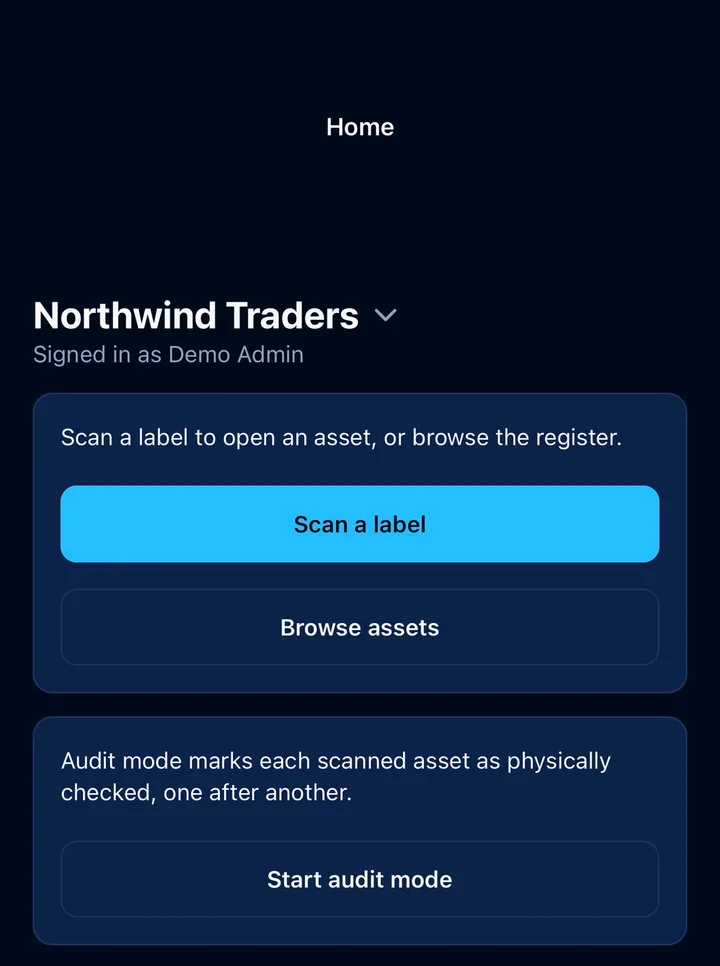
Scan a label to open the asset
Point the camera at a printed QR label and the asset opens, with its whereabouts, status, history, photos, attachments, maintenance records and linked tickets.
Change whereabouts and status
Assign to a person or location, put an asset into stock, or change its status, including your own custom status labels, with the same one-tap next steps as the web app.
Add assets from the phone
Scan an unknown serial or tag and choose Create asset, or fill in the basics by hand. A blank tag takes the next free one, and photos can be taken with the camera.
Audit mode
Records an audit for each label you scan, as the stock-take workflow does in the browser, and tells you when a label belongs to a different server or is not found.
Stock
Check accessories out, install components and issue consumables from the stock room or the desk you are standing at.
Browse and search
Assets, people, locations, accessories, components and consumables, for when there is no label to scan.
App lock
An optional Face ID or Touch ID lock, with the device passcode as fallback, guards the app when it opens or returns to the foreground. The sign-in session is unaffected; the lock only gates the screen.
Appearance
Match the device, or force light or dark.
In the latest app update
These need Tagaris 2.6.0 or later on the server.
Audits with no signal
When the server cannot be reached (a comms room, a warehouse, anywhere off the office network) audit mode keeps scanning. Each scan is saved on the phone with the time it was made, shown as waiting, and sent by itself when the server is back, or on Sync now. The audit is recorded at the time of the scan, a late scan never undoes a newer audit, and anything the server refuses is listed with the reason. Only audit scans queue; edits still need the server.
Report an issue after a scan
The asset's screen lists its issues and has Report an issue, so a fault found on a walk round is logged against the right item there and then.
Buttons that follow your permissions
What the app offers follows the same roles and access groups as the browser. A person who may record audits but not move kit sees exactly that, and a person limited to particular sites sees only what is there.
Pairing and signing in
There is no separate mobile account. The app uses your own sign-in.
Enter your server address
The same address you use in the browser, for example
https://assets.example.com.
Sign in as you do in the browser
Password with two-factor if it is enabled, or single sign-on. There is no API key to create; the app uses your own session, so your role and your organisation's security policy apply unchanged.
Work the register
The app remembers the server and the session. Sign out from the Account tab.
What the server needs
- Tagaris 2.3.0 or later. The app's endpoints ship with the server, so there is nothing extra to install.
- Any tier, free included. The app is separate from the REST API.
- An address the phone can reach, so not
localhost, withBETTER_AUTH_URLset to match it. - Plain
http://is fine for a server on your own local network. Anything reached over the internet should sit behind a reverse proxy with HTTPS. - A certificate from a public authority such as Let's Encrypt where you can. iOS does not trust self-signed certificates unless the certificate is installed on the device.
- The mobile app guide and the install guide cover the details.
Privacy
The app connects only to the server address you enter. It sends nothing to Goodhall Solutions or to any third party, carries no analytics, and stores only your server address and session on the device, in the iOS keychain or the Android keystore. The security page covers the server side.
Try it against the public demo
Pair the app with demo.tagaris.co.uk. The demo credentials are
shown on the sign-in screen. The Scan tab needs a printed label, so the Browse
tab is the quickest tour: asset detail, status changes and stock.
Android
The same app is on Google Play. A server on your own network over plain http works without any setting, and the app lock uses fingerprint or face unlock. Scanning a printed label with any phone camera still opens the asset's page in the browser.
Questions people ask
Does the app need a paid licence?
No. The app works on the free tier. Its endpoints ship with the server and are separate from the REST API. Whatever your role, access groups and licence allow in the browser, they allow in the app.
Do I need a separate account for the app?
No. You sign in with the same account and the same method as in the browser, including two-factor and single sign-on. Accounts are created on your own server by its administrator; the app has no account creation and no backend of its own.
Can I scan labels without the app?
Yes. A Tagaris QR label opens the asset's page in the browser when scanned with any phone camera. The app adds audit mode, which records an audit for each label you scan, plus photos from the camera, the app lock, and pairing that remembers your server and session.
Get the app
Free on the App Store and Google Play. Pair it with your own server, or with the public demo to try it first.