Asset management for MSPs
Tagaris is a self-hosted IT asset register built to run one install for many clients. Each client is a separate organisation with its own register, your technicians sign in once, and the whole thing runs on your own server for a flat annual price.
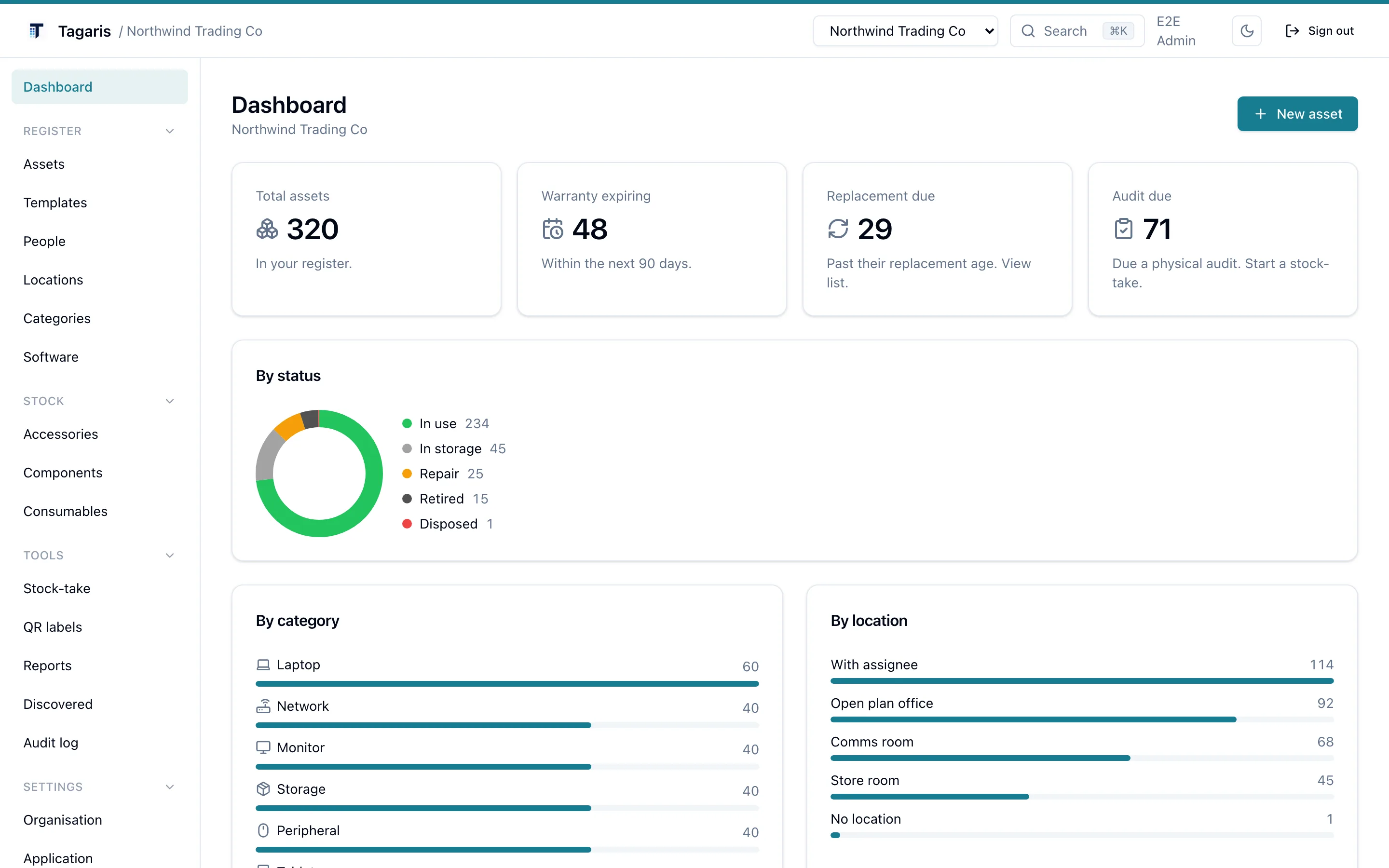
The dashboard for one client organisation, shown with demo data.
What an MSP needs from an asset register
Tracking twelve clients' kit is a different job from tracking your own.
A register per client
Each client needs its own complete register: assets, people, locations, history. A client column in a shared spreadsheet works until the first client asks for an export.
Separation you can show a client
Client data has to stay separate. A technician working in one client's register should see nothing of another's, and an export for one client should contain only that client.
One login for your technicians
Nobody wants twelve passwords for twelve portals. A technician signs in once and switches between the clients they cover.
How Tagaris models it
One install on your server. One organisation per client. Access granted in groups.
Install once
Two containers on a server you control, started with
docker compose up. The first run creates your own organisation and the
owner account.
Add an organisation per client
The multi-organisation add-on covers creating further organisations. Each one is a separate register with its own assets, people, locations and settings.
Grant access with groups
A cross-org group gives a set of technicians one role, and any permissions you choose, across a chosen set of client organisations. When a new client comes on, add their organisation to the group and the whole helpdesk has access.
Access that matches how an MSP works
Roles are per organisation: Admin, Editor or View only. A technician's effective role in a client organisation is the highest of any direct membership and any group that covers it, so first-line staff can be view only everywhere while senior engineers edit the clients they own. A cross-org group can also carry permissions, so a service desk group can work issues and move kit across every client without being Editors anywhere. Within one client, an access group gives a person a particular job, and a person can be limited to particular sites.
The install owner holds a SuperAdmin account. It manages the install-wide settings (the licence, single sign-on, creating organisations and groups), can reach any organisation, and stays a local password login, so it still works if your identity provider is down.
- Admin, Editor and View only roles per organisation; view-only sign-ins are free and unlimited
- Cross-org groups grant one role, plus permissions, across a chosen set of client organisations
- The highest of direct and group access applies
- Access groups and site limits within a client organisation
- The SuperAdmin owner account manages the install and the licence, and is never a seat
- Single sign-on with Microsoft Entra ID, Okta, Google Workspace or any OpenID Connect provider, with an option to require it
What each client organisation gets
An organisation is not a filter on a shared list. It is a full register of its own.
- Its own assets, each with a dated history of changes
- Its own people, locations and location tree
- Its own reports, with CSV export and print
- Its own audit log of who changed what
- Scheduled email reports on its own schedule
- Its own custom fields and status labels
- Its own issues, vendors, purchase orders and contracts
- Its own name, logo and accent colour, so the client you are working in is obvious
- Its own staff issue form, on its own hostname (help.customer-x.com) with the client's branding
- Its own full export to JSON, on any tier
What it costs
Pricing is by technician seats and organisations. Assets are unlimited on every plan.
A worked example
An MSP with 8 technicians and 12 client organisations takes Team 10 at £399 a year for the technician seats, and the multi-organisation add-on at the up to 15 tier for £499 a year.
The total is £898 a year, about £74.83 a month, covering every asset across all twelve clients. Onboarding a client with 400 endpoints costs the same as one with 40.
How the counting works
A seat is a technician who can change things: an Admin, an Editor, or a view-only person given a permission through a group. Seats are counted per organisation, so the same eight technicians covering twelve clients are eight seats in each. The install owner is never a seat, view-only sign-ins are free and unlimited (so a client can be given a look at their own register at no cost), and the people recorded in each client's register are not users at all.
Team plans come in 5, 10, 25 and 50 seat sizes, from £229 a year. The multi-organisation add-on comes in tiers of up to 5 (£199), up to 15 (£499) and up to 50 (£999) organisations a year. Full details on the pricing page.
Why self-hosted suits MSPs
Most MSP asset tools are SaaS, priced per endpoint or per client, so the bill grows with every device you onboard. Tagaris runs on your own infrastructure, and the licence is a flat annual price whatever the estate looks like.
After one activation call, or with a licence file, licence keys are verified offline on your server using Ed25519 signatures, so an annual licence behaves the same on an isolated network as on the internet. If a client contract says their data stays in the UK, or stays on your hardware, that is where it is.
- Runs with Docker on your own server, comfortable on a small VPS
- No per-asset, per-device or per-client fees
- Annual licence keys verify offline after a single activation, or with a licence file on air-gapped servers
- Export everything to CSV or JSON at any time, on any tier
- Scheduled backups with restore, optionally encrypted and copied to S3-compatible storage
Device sync, free and still in testing
If a client's devices are already in an MDM, you do not have to type them in again.
Microsoft Intune
The Intune connector pulls managed devices into a review queue. Each device is matched against the register by serial number first, then hostname. You link it to the matched asset, import it as a new asset, or ignore it.
Re-syncs run daily or weekly and never resurrect a device you have already actioned.
Jamf
The Jamf connector does the same for managed Apple devices, through the same review queue and matching.
Both connectors take per-connector filters, such as operating system and last seen, and you choose whether confident serial matches link automatically or everything waits for review.
Device sync is free and open on every plan, with no key to request. It has not yet been proven across a range of real tenants, so tell [email protected] how it behaves on yours.
One install, every client
See the full pricing breakdown, or try the current release in your browser before you install anything.