Self-hosted IT asset management
Tagaris is an IT asset register that runs on your own server with Docker Compose. Two containers, one small box, and every record on hardware you control.
Why self-host an asset register
The register holds the map of your estate: serial numbers, who has what, where it lives, what it cost. That belongs on your own infrastructure, under your backup policy and your access rules, in a PostgreSQL database you can query directly.
Self-hosting also changes the economics. Tagaris is priced by seats, never by asset count, and the free tier has no asset limit, so the register does not get more expensive as you record more of the estate.
It works where hosted software cannot. Tagaris runs on an isolated network with no internet access. Paid licence keys activate once and are then verified offline on your own server; fully air-gapped installs use a licence file instead, with no internet at all.
- Your data in your own PostgreSQL, on your own server
- Priced by seats, with no per-asset charges
- Works on an isolated network with no internet access
- Licence keys verified offline; air-gapped installs use a licence file
- No agents on your machines and no telemetry
- Free tier with no asset limit
What it runs on
A small VPS or a homelab box that is already on. There is nothing else to install.
Two containers, or one
The app and PostgreSQL 16 by default, or a single self-contained container with the database built in. Named volumes hold the database, the photos and the uploads, and the containers themselves are disposable.
About 1 GB of memory
Comfortable on the smallest VPS most providers sell. More assets and photos mainly cost disk, so the memory footprint stays put as the register grows.
amd64 and arm64
Images are built for both architectures, with provenance and SBOM attestations, and scanned with Docker Scout. A NAS or a Pi-class box works.
Three ways to run it
Pick the shape that fits your setup. All three run the same application.
Standard
The app and its own PostgreSQL container, brought up together with Docker Compose. The setup shown below, and the right choice for most people.
Self-contained
One container with PostgreSQL built in, so there is nothing else to install. Good for Unraid and keeping everything on a single machine.
Dedicated database
The app on its own, pointed at a PostgreSQL server you already run, so there is no extra database to manage.
Installing
A compose file and a couple of commands. The step-by-step guides, one for each option above, live in the documentation, so they stay current as releases change.
The full compose file, the .env, a plain docker run install, and the
single-container and dedicated-database setups are all in the
install guide.
What happens at boot
From docker compose up to a signed-in administrator in a few minutes.
Migrations apply themselves
On every start the app applies any pending database migrations, then listens on port 3000. The first start also pulls the images, so allow a minute or two.
The setup wizard
The first visit in a browser opens the setup wizard, which creates your organisation and the first administrator account. That account owns the install, so give it a strong password and store it safely.
Load the register
Import your existing spreadsheet as CSV with column mapping and a dry-run preview. Coming from Snipe-IT or Halo? Presets recognise their columns and translate their status names.
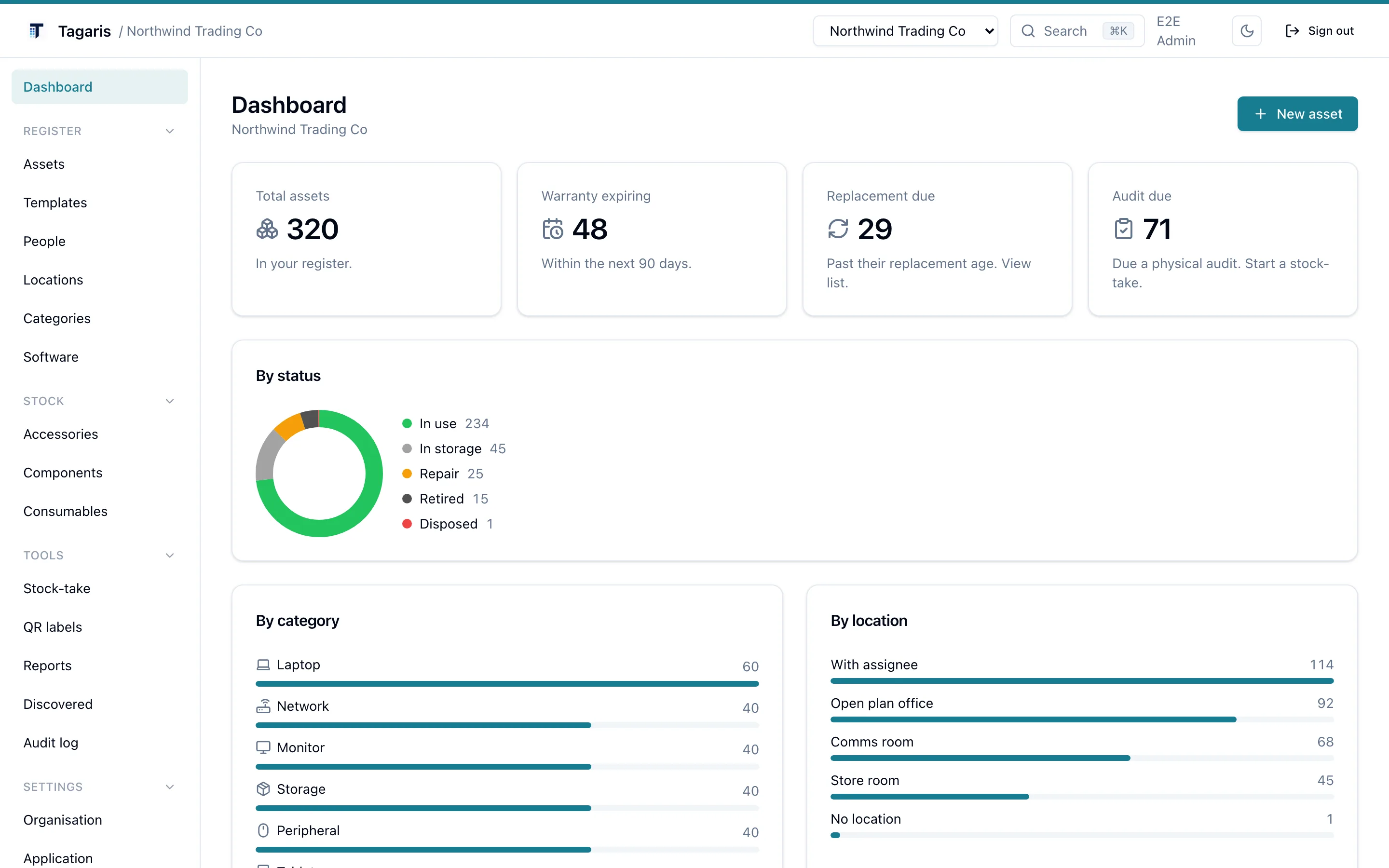
The dashboard after setup, shown with demo data.
Day-two operations
Everything a small install needs afterwards is built in.
Scheduled backups
Tagaris backs itself up from Application settings: a database dump plus, optionally, the photos and attachments volume, in one archive, on a daily or weekly schedule, with retention and optional passphrase encryption.
Restore is built in too, behind a typed confirmation. Test it before you need it.
Offsite copies
Each backup can also be copied to S3-compatible storage, meaning any provider or appliance that speaks the S3 API, so a failed disk does not take the backups with it.
Updates
Pin a version tag in the compose file rather than tracking latest.
To upgrade, edit the tag, then docker compose pull and
docker compose up -d. Migrations apply at start and the volumes carry
straight across. A backup first makes a rollback trivial.
Getting data out
Export the whole register to CSV at any time, and a full organisation export to JSON covers every record. Both are on the free tier, so archiving or migrating is a download.
You run the server
Self-hosting means the operational jobs land with you. Backups run themselves once configured, but choosing where the archives go, and proving a restore actually works, is your responsibility. A backup you have never restored is a guess.
TLS is yours too. The container serves plain HTTP on port 3000. For anything beyond
a first look on a private network, put it behind a reverse proxy that terminates
HTTPS (Caddy, nginx or Cloudflare) and set BETTER_AUTH_URL to the
https address; session cookies and sign-in depend on it.
The most common install mistake is leaving BETTER_AUTH_URL at
localhost: printed QR labels and invite links then point at localhost and will not
open on other devices. The second is a database password containing characters such
as : or @, which break the connection URL. Use letters
and digits.
Know what Tagaris is: a register rather than a discovery tool. It records what you enter, import or pull from Microsoft Intune and Jamf (free, still in testing). It does not scan your network, and it sends no telemetry; the only default outbound call is a daily version check you can switch off.
Who it is for
Small IT teams
The free tier is every feature for the owner and unlimited view-only people, with no asset limit and no trial clock. When more people need to change things, a Team licence adds seats, with Admin and Editor roles and access groups.
MSPs
Run one install for all your clients. Multiple organisations on a single instance is a paid add-on: each client gets its own register, its own users and its own settings, with nothing shared between them.
Homelabbers
About 1 GB of memory and an arm64 image mean a NAS or a Pi-class box is enough. Print QR labels for the rack and keep the serial numbers and warranty dates where you can find them.
Try it before you install it
The live demo runs the current release in your browser. When you are ready, the install is three commands.