The whole life of an asset
From the purchase order to the recycler, with the dates, values and evidence kept on the record.
Purchase and warranty
Purchase date, price, supplier and warranty end are optional fields on every asset, and each one feeds something later: the value reports, the renewal digest, the replacement flag. A category can carry a default warranty term for its assets. The dashboard shows warranties expiring in the next 90 days, and the daily digest warns at 90, 30 and 7 days by default.
Receipts, invoices, warranty certificates and manuals attach to the asset (up to ten files of up to 10 MB each), so the proof sits next to the record when a claim comes up. Maintenance records log the repairs along the way.
- Serial format checks for Dell, Lenovo and Apple
- A warranty lookup link for Dell, Apple, Lenovo and HP
- Duplicate serial and MAC warnings on create and on import
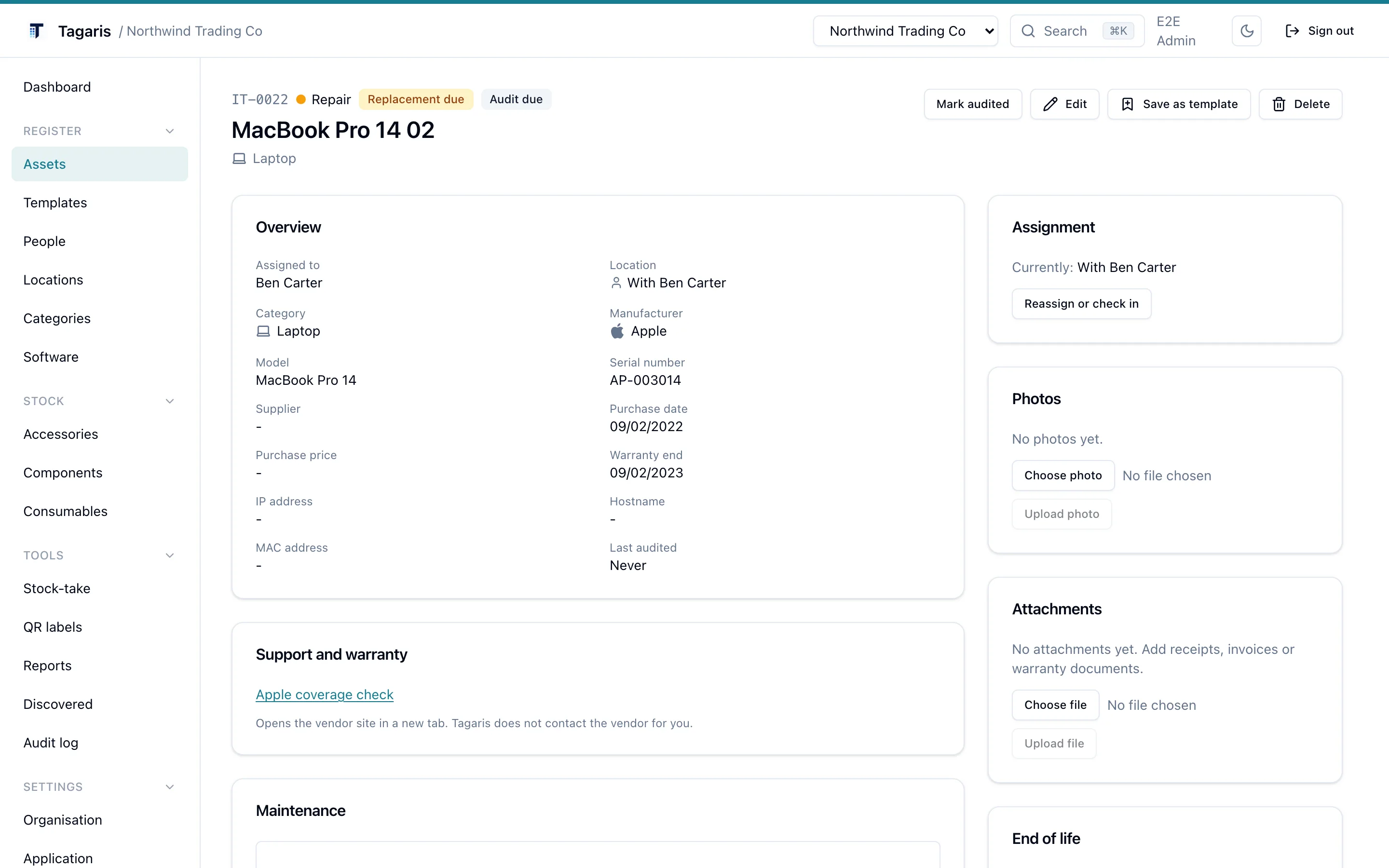
Serial numbers that know their maker
Set the manufacturer and the serial field knows what to expect: a Dell service tag is seven characters, a Lenovo serial eight, an Apple serial ten to twelve. A mismatch shows a warning and never blocks saving. The asset page then links to the maker's own lookup for the serial you entered: Dell support, Apple's coverage check and Lenovo's warranty lookup open with the serial filled in, and HP opens its warranty check page for you to paste it.
Type a known Apple model number such as A2338 and Tagaris offers to fill in the name, model and category. All of this is local, with no third-party calls. The one optional exception is Dell: add your own Dell TechDirect API key to the environment and Tagaris can look warranty details up directly; leave it blank and that lookup stays off. The installation guide lists the setting.
Replacement age and depreciation
Replacement due
Give a category a replacement age in months and every asset in it gets a computed replacement due date from its purchase date. An individual asset can carry its own age to override the category; leave it blank to inherit. Past the date, the asset shows a quiet Replacement due badge, counts on the dashboard tile, joins the daily digest and appears in the calendar feed. Budget season gets a list instead of a guess.
Straight-line depreciation
Set a useful life in months and a residual percentage per category, and each asset's current book value follows from its purchase price and date: evenly down to the residual, then flat. The Asset value and depreciation report totals it, Value by location splits it by site, and both export to CSV. Any ISO 4217 currency, chosen per organisation.
Disposal keeps the record
Disposing an asset records the date, the method (sold, recycled, donated, written off, lost or stolen), any proceeds and a note, and snapshots the book value at that moment, so a later change to the category's rule does not rewrite history. The asset leaves the default asset list, the stock-take, the replacement-due flag, warranty alerts and the value totals, and stays reachable through the status filter with its full history. Reinstate undoes it if the disposal was a mistake. Hard delete remains for data entry errors only.
The Disposals report lists the last twelve months with book value, proceeds and the gain or loss on each, and exports to CSV like every other built-in report. The assets guide covers the workflow, and the Snipe-IT switching guide shows how existing statuses map across.
Which plan do I need?
Everything on this page is in the free tier, including the reports, the custom report builder and scheduled email reports. A Team licence adds more users. See pricing.
Questions
Does Tagaris check warranties with the manufacturer automatically?
No. It links to the maker's own lookup for Dell, Apple, Lenovo and HP, and can query Dell's warranty API if you add your own Dell TechDirect key. Otherwise the warranty end date is what you record.
What happens to a disposed asset's data?
It stays. The asset keeps its history, photos and attachments and is reachable through the status filter. It only leaves the default lists, the alerts and the value totals. Reinstate puts it back.
Can I set a different replacement age for one asset?
Yes. An asset can carry its own replacement age in months, which overrides its category's rule. Leave it blank to inherit the category.
Try it before you install it
The live demo runs the current release in your browser. No sign-up.